As we head into 2026, the way we use the internet has reached a huge turning point. In the past, "privacy" mostly meant being left alone. But today, because artificial intelligence (AI) has become so powerful and common, that old way of thinking doesn't work anymore. Now, your personal information is being used in ways that are faster and more automatic than ever before. To keep yourself safe in 2026, you can’t just sit back—you have to be active in choosing what the digital world is allowed to see about you.
This new reality is driven by three things: powerful AI, new laws like the California Delete Act, and the fact that your personal info is now worth a lot of money to hackers. In 2026, it’s getting hard to tell if you’re talking to a real human or a computer. Scammers now use "Shadow Agents"—smart AI bots—that are incredibly fast. They don't just target random people; they use AI to study you specifically, learning your habits and personality so they can trick you more easily.
Think about the "digital exhaust" you leave behind. Just like a car leaves behind fumes as it drives, you leave a trail of data every time you use social media, shop online, or search the web. In 2026, AI models are harvesting all those years of your old data to build a "Digital Twin" of you. This is a computer version of your identity that can copy your voice, the way you write, and even your little habits perfectly. Because of this, the old ways of protecting yourself—like just being skeptical—aren't enough. You need to stop using one single "real" identity for everything and start using "masked" or fake identities to keep your true self safe.
Why You Can’t Trust Your Ears or Eyes Anymore
The biggest problem we face in 2026 is that we can no longer prove people are who they say they are. For a long time, we thought a person’s voice or face was proof of their identity. But today’s "deepfake" technology has ruined that. Scammers can now perfectly copy the voice of your boss or even a family member. You might get a video call that looks and sounds exactly like someone you know, but it’s actually a computer. Because you can no longer trust what you see and hear, you have to start using secret "safety codes"—tools that used to be for spies but are now necessary for every family.
Your AI Assistants Could Be Spying on You
It’s not just people you have to worry about anymore. By 2026, there are many more "AI agents" online than there are real people. These are programs designed to help you, like a digital assistant that schedules your meetings or buys your groceries. However, these assistants can be "poisoned" or hacked. A hacked assistant becomes a "Shadow Agent"—it looks like it's still working for you, but it’s actually stealing your information in the background. Because of this, you can’t just blindly trust your software. You have to treat your digital tools with the same caution you would use with a stranger.
New Laws Give You the Power to Delete Your Data
While the threats are getting worse, the laws are finally catching up to protect you. 2026 is a huge year for your rights. The government is finally cracking down on "Data Brokers"—companies you’ve probably never heard of that spend all day collecting and selling your personal secrets.
The California "Delete Act" – Your Best Defense
The biggest weapon you have in 2026 is a new law called the California Delete Act. This law targets "Data Brokers"—shady companies that collect your personal info (like where you live, what you buy, and your phone number) and sell it to others.
In the past, if you wanted these companies to stop selling your info, you had to find and contact over 500 different companies one by one. It was nearly impossible.
The New "One-Click" Solution: DROP Starting January 1, 2026, California is launching a website called DROP (Delete Request and Opt-out Platform). It changes everything:
- One Single Request: Instead of contacting 500 companies, you just go to the DROP website once. You verify who you are, click a button, and the state sends a "Delete Me" order to every single data broker at the same time.
- The "Nuke" Button: This effectively wipes out the "digital file" these companies have built on you over the last decade.
- It’s Not Just for Californians: While this is a California law, most major data brokers will likely apply these deletes to everyone in the U.S. It's too expensive and messy for them to keep a "California list" and a "rest of the country list," so your request will likely work no matter where you live.
The Timeline: What to Expect
- January 1, 2026: The website opens. You should go there and sign up immediately.
- August 1, 2026: This is the deadline when companies must start processing these requests. From this point on, they have to check the list every 45 days and delete any new info they find on you.
- The "Stay Deleted" Rule: This is the best part. The law doesn't just make them delete your info once; it requires them to keep you on a "Do Not Track" list. This ensures they don't just "accidentally" find your info again and start selling it a month later.
A Global Push for Safer AI
Across the ocean, Europe has launched a major law called the EU AI Act. This law is like a rulebook that ranks different types of AI based on how dangerous they could be to your safety or your rights. One of the most important rules for 2026 is a total ban on AI that "scrapes" your face. This means companies are no longer allowed to vacuum up photos of you from social media or security cameras just to build giant databases that can recognize your face wherever you go.
Because of these rules, companies now have to prove where they got their data—a concept called "Data Provenance." For you, this means you have a new right to know exactly how your personal info was used to train a company's AI. It even gives you the power to demand that a company "un-learn" your information. This is called "disgorgement," and it forces the company to remove your specific influence from their AI model entirely, so they can't profit from your data anymore.
Companies Can No Longer Ignore You
In 2026, states like Colorado, Connecticut, and California are working together to send a clear message to big tech: "You can't ignore a person's choice to be left alone." They are cracking down on "Dark Patterns"—those sneaky website designs meant to trick you. You’ve seen them before: the button to "Accept All Tracking" is big and bright, while the "No" button is hidden in tiny text or uses confusing language to make you feel bad for clicking it. In 2026, these tricks are against the law. If you say "No" to being tracked, companies are legally required to listen.
The best way to protect yourself is by using a tool called Global Privacy Control (GPC). Think of this as a "Master Switch" inside your web browser. Instead of having to find a "Do Not Sell My Info" link on every single website you visit, you just turn this switch on once. It sends a legal signal to every site you browse, telling them: "This person does not want their data sold." In the past, companies could just ignore this signal, but in 2026, it carries the weight of a legal order. It turns your private preference into a rule that companies must follow.
How Scammers Use AI to Trick You: AI Agents, Deepfakes, and Psychological Warfare
To effectively secure one's digital life in 2026, one must understand the specific mechanics of the threats. The adversary has moved beyond "hacking" in the traditional sense of breaking firewalls; they are now "hacking" the human and the agent.
Watch Out for "Personalized" Scams
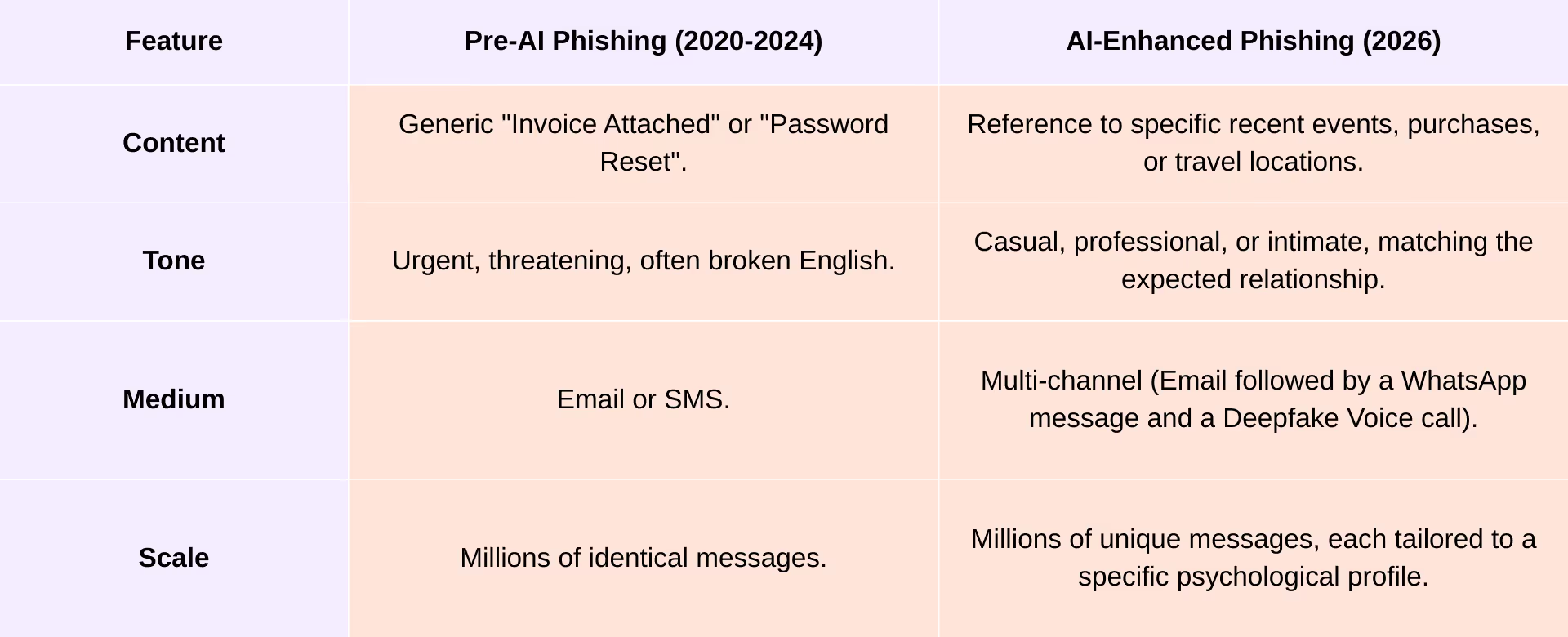
In the past, you could usually spot a scam email because it had bad grammar, spelling mistakes, or felt like it was sent to thousands of people at once. But in 2026, scammers are using AI to make their messages look perfect. They use a trick called "Hyper-Personalized Phishing." Instead of sending random emails, they feed an AI your social media posts, your job history, and even information about your family. The AI then writes a message that sounds exactly like it’s coming from a friend, a boss, or a family member. It might mention a trip you just took or a project you’re actually working on, making it incredibly hard to tell that it’s a fake.
The Growing Threat of "Quishing" (QR Code Scams)
A new type of scam called "Quishing" is becoming very common in 2026. This is basically a "phishing" scam that uses a QR code instead of a link. Because security filters are now very good at spotting dangerous links in text, scammers have started hiding those links inside images of QR codes. You might see these codes in an email, inside a PDF attachment, or even on a sticker in public. When you scan the code with your phone, it takes you to a fake website designed to steal your passwords or install viruses. These attacks work so well because our phones often don't have the same heavy-duty security as our work computers.
How to Stay Safe: You should treat every QR code with caution, just like you would a suspicious link. Whether you are scanning a code at a parking meter or one in a digital document, always look at the web address (the URL) that pops up on your screen before you click to open it. If the name of the website looks strange or has typos, don't go there. It only takes a second to check, and it can save you from a major headache.
The Deepfakes and the "Grandparent Scam" Gets a High-Tech Upgrade
The old "grandparent scam" has become much more dangerous. Scammers now use AI to "clone" voices. All they need is a short clip of someone’s voice—even just three seconds from a video posted on social media—to make a computer sound exactly like them. They call a victim and sound exactly like a child or grandchild in a panic, claiming they’ve been in an accident or arrested. In more professional settings, they even use "video deepfakes" to look like a company boss on a video call to trick employees into sending money.
The Solution: A Family "Safe Word" These scams work because they trick your brain into believing that the fake person is real. Since technology is making it harder to trust our eyes and ears, the best defense isn't a tech tool—it’s a simple plan. Families and businesses should choose a secret "Safe Word" or phrase that is never shared online. If you ever get a suspicious or frantic call, you simply ask for the safe word. If the person on the other end doesn't know it, you’ll know immediately that you’re talking to an AI clone and can hang up safely.
The Best Way to Protect Yourself: Using "Masks"
To stay safe in 2026, you need to change one big habit: using the same email and phone number for everything. For years, most of us have used one primary email as the "Master Key" to our digital lives—using it for our bank, our social media, and even random shopping sites. This is a huge risk. If a small grocery delivery site gets hacked, the hackers now have the "key" to your bank and your private life. It’s like having one key that opens your front door, your car, and your safe; if you lose it, you lose everything.
The Solution: Identity Masking
The best way to fix this is with "Identity Masking." Instead of giving out your real information, you use "masks"—which are fake, disposable email addresses and phone numbers. Think of it like wearing a different disguise every time you go into a new store. If one store gets hacked or starts sending you spam, you can just "throw away" that specific mask without it affecting your real email or your other accounts. This keeps your true identity hidden and ensures that a leak in one place doesn't ruin your whole life.
How "Masking" Works in Real Life
Identity masking is a simple process where you create a unique "fake" ID for every website or app you use. This covers both your email and your phone number.
1. Unique Email Masks Instead of using your real email (like [email protected]) for everything, you give each service its own unique address.
- Example: For Netflix, you’d use something like [email protected]. For your bank, you’d use [email protected].
- The Benefit: If Netflix ever gets hacked, the scammers only have a "fake" email that doesn't work at your bank. Even better, if that Netflix email starts getting spam, you know exactly who sold your data. You can simply "turn off" that one email like a light switch without affecting any of your other accounts.
2. Phone Number Masks Today, your phone number is like a digital Social Security number—it’s used to track you and log you into your most important accounts. Giving your real number to a random store or a social media site is a major risk.
- How it works: You use a "masked" or temporary phone number for most things. This number acts as a bridge; it forwards calls and texts to your real phone without ever revealing your true number.
- The Benefit: This keeps your real phone number hidden from giant databases that hackers love to search. It also protects you from a "SIM Swap" scam, where a hacker steals your phone number to break into your bank account. Since you never gave out your real number in the first place, they can't target it.
Scrambling Your Digital Trail
By using different "masks" (fake emails and phone numbers), you are essentially scrambling the trail you leave online. Data brokers—the companies that build files on you—rely on finding a single piece of information, like your real phone number, to link all your activities together. They want to see that the person who bought hiking boots is the same person who just searched for a new car. When you give every store a different "mask," the data broker gets confused. Instead of one clear picture of you, they see a hundred different people that they can’t connect. Your personal "file" becomes a bunch of disconnected puzzle pieces that no one can put together.
This strategy fits perfectly with the new privacy trends of 2026. While many laws are now telling companies they should collect less data, you shouldn't wait for them to listen. Since you can't always force a company to stop asking for your information, the smartest move is to control what you give them. By providing a "mask" instead of your real identity, you take the power back and keep your private life private.
A "Digital Secretary" for Your Life
By 2026, trying to manage hundreds of different "masks" (fake emails and phone numbers) on your own would be impossible. It would be like trying to remember hundreds of different names and birthdates. That’s why the most important tool in your privacy kit is an Identity Manager (like the service "Cloaked"). Think of this as a "Digital Secretary" that works in the background to keep you organized.
How it Makes Life Easier:
- Instant Disguises: When you sign up for a new website, the manager automatically creates a new email and phone number for you instantly. You don't even have to think about it.
- Smart Forwarding: When a company sends an email or text to your "mask," your manager safely forwards it to your real inbox or phone. You can read and reply like normal, but the company never sees your real address.
- Handling the "Secret Codes": The manager also handles those 6-digit security codes (2FA) that websites text you. It catches the code and types it in for you, so you don’t have to switch back and forth between apps.
By letting a tool handle the details, protecting your privacy stops being a "chore" and becomes a seamless part of how you use the internet. You get all the protection without any of the extra work.
Beyond the Passwords - Start Using Secure Passkeys
The password, as a concept, is effectively dead in 2026. The volume of credential stuffing attacks—where AI bots test billions of leaked username/password combinations—has rendered the static string of characters indefensible.
The End of the Password and Rise of Passkeys
In 2026, the tech world has moved away from passwords and switched to something much safer called Passkeys. A passkey is a secret digital key that stays only on your device (like your phone or laptop). Unlike a password, which is a "secret" you share with a website, a passkey never leaves your hands. To log in, you just use your fingerprint, face scan, or screen PIN—the same way you unlock your phone.
Why They Are "Scam-Proof" (Phishing Resistant): Passkeys are incredible because they are impossible to steal through a fake website. For example, if a scammer tricks you into visiting a fake site like g00gle.com (with two zeros) instead of the real google.com, a password would be stolen the moment you type it. But a Passkey will simply refuse to work. Your device knows the key was made for the real google.com, so it won't even show the option to log in on the fake site. You don't have to be an expert at spotting fake links—your device does the work for you.
Checklist Action: Secure Your "Big Four" Accounts
The most important thing you can do today is "audit" your main accounts and switch them to Passkeys. Start with these four:
1. Google (Your Gmail and Android life)
2. Apple (Your iCloud and iPhone)
3. Microsoft (Your Outlook and Windows PC)
4. Your Bank (The most sensitive link)
What to do: Go into the "Security" or "Sign-in" settings for these accounts and look for the option to "Create a Passkey." Once you set it up, you can stop relying on your old, hackable password and use your face or fingerprint instead.
The Best Ways to Lock Your Accounts
In 2026, relying on a text message (SMS) for your security codes is considered a "critical weakness." Scammers have found easy ways to intercept these texts or trick phone companies into sending your messages to them instead. To stay safe, you should follow this "Security Ladder" and move toward the top:
- The Gold Standard (Hardware Keys): These are small physical devices (like a YubiKey) that look like a USB thumb drive. You plug it into your computer or tap it against your phone to prove it’s you. Because a hacker doesn't have the physical key in their hand, they cannot get into your account from far away.
- The Silver Standard (Passkeys & Biometrics): As we mentioned before, using your face, fingerprint, or a digital Passkey is incredibly secure and very easy to use.
- The Bronze Standard (Authenticator Apps): Apps like Google Authenticator or Authy are much safer than text messages because the codes stay on your phone and aren't sent over the air. They are great for everyday security.
- The "Last Resort" (SMS & Email): Only use text or email codes if the website offers nothing else. They are better than nothing, but they are the easiest for hackers to bypass.
Your Goal: Move Away from Text Codes You should try to move your most important accounts (like your bank and email) away from text message codes. If a website forces you to use a phone number and won't let you use an app or a key, use one of your "Masked" phone numbers instead of your real one. This adds an extra layer of protection and keeps your real SIM card safe from hackers.
Digital Hygiene: Clean Up Your Digital Footprint to Stay Secure
Think of your phone and your computer like a house. Over time, we collect "digital junk"—old apps we don't use and accounts we forgot we ever made. In 2026, this clutter is more than just annoying; it’s a major security risk. Every old account is a "back door" that a hacker could use to get to your data. To stay safe, you need to practice Digital Minimalism: keeping only the tools you actually need and trust.
The "Zero-Trust" App Audit You should treat every app on your phone with a "Zero-Trust" attitude—meaning you don't trust it just because it's already there. Follow these three rules:
- The 3-Month Rule: Look through your phone right now. If you haven't opened an app in the last three months, delete it. You can always download it again later if you really need it, but keeping it around just gives scammers one more way to track you.
- Be Ruthless with Permissions: Apps often ask for things they don't need. Does a simple calculator app really need to see your "Contacts"? Does a flashlight app need to know your "Location" at all times? Go into your phone’s settings and turn off any permissions that seem suspicious. If an app doesn't need it to work, take it away.
- The "Ghost Account" Rule: Simply deleting an app from your phone isn't enough. The company still has your data on its servers. Before you uninstall an app, look for the "Delete Account" button inside the app's settings. This forces the company to wipe your info from their computers so it can't be stolen in a future hack.
Cleaning Up Your Inbox for Top-Notch Security
Your old emails are a gold mine for hackers. If someone breaks into your inbox, they aren't just looking at your new messages—they are digging through years of "digital footprints" like old tax returns, medical records, and password resets. In 2026, a clean inbox is one of your best defenses.
1. Search and Destroy Sensitive Files Don't let your sensitive documents sit in the cloud forever. Use your email’s search bar to find keywords like "SSN," "Passport," "Tax," "Invoice," or "Password." * The Rule: If you need to keep a document, download it to a secure, encrypted hard drive or a physical USB stick. Once it's saved locally, delete it from your email and empty the trash.
2. Set Up "Auto-Delete" for Junk Most people let their "Trash" and "Spam" folders grow forever, but these are still parts of your account that hackers can see.
- The Rule: Go into your settings and ensure your "Trash" and "Spam" are set to auto-delete every 30 days. This ensures that even if you forget to empty them, your email provider will "take out the trash" for you automatically.
3. Unsubscribe to Stop "Spy Pixels" Marketing emails often contain tiny, invisible images called "Tracking Pixels." When you open the email, that pixel "pings" the sender to tell them exactly when and where you opened it. This confirms to scammers that your email address is active and that you are a "clicker" who is worth targeting.
- The Rule: Be ruthless with the "Unsubscribe" button. If you don't read a newsletter, get off the list. This doesn't just clear your inbox—it actually breaks the link that scammers use to track your habits.
Cleaning Up Your Social Media
In 2026, social media is no longer just a place to share photos—it’s the primary source of data for "AI Scrapers." These are automated bots that crawl through your profile to "learn" how you talk, who you know, and what you look like. Scammers use this info to build perfect "Deepfakes" of your voice or to write scam emails that sound exactly like you.
1. Set Everything to "Private" The simplest and most effective move you can make is to set your accounts to Private.
- The Benefit: When your account is private, AI scrapers can’t see your posts, and search engines like Google won't link to your profile. This forces a "wall" between your personal life and the bots trying to harvest it. If you have an old account you don't use anymore, don't just leave it—delete it entirely.
2. The "1-Year Rule" for Old Posts You don't need a decade of history sitting on your profile. Old tweets, status updates, and photos provide a "psychological map" that hackers use to trick you. They can see where you went to school, your old pets' names, or your political views to create a custom-made scam just for you.
- The Rule: Use a "Bulk Delete" tool (like Redact or Auto Post Delete) to wipe away any posts older than one year. Keeping your profile "light" means there is less data for an AI to use against you.
Staying Financially Secure in an Era of Instant Fraud
In 2026, money moves faster than ever. Between apps like Zelle, Venmo, and instant bank transfers, a scammer can drain your account and move the money somewhere else in seconds. Because these payments are almost impossible to "undo," you have to change your strategy. You can't just wait to detect a scam; you have to prevent it from starting in the first place.
The "Credit Freeze": Your Digital Deadbolt The single most important move you can take is to Freeze your credit. In 2026, leaving your credit "unlocked" is like leaving your front door wide open.
- What it does: A freeze locks your credit file so no one (not even you) can open a new credit card or take out a loan in your name.
- The Action: You need to contact the three major credit bureaus—Equifax, Experian, and TransUnion—and tell them to "Freeze" your reports. It’s free, and if you ever need to buy a car or get a loan, you can "thaw" it in minutes using their apps.
Don't Forget the "Hidden" Bureaus Most people stop at the big three, but scammers are smarter now. They use "hidden" bureaus to open fake bank accounts or sign up for expensive phone plans in your name.
- Freeze ChexSystems: This is the bureau that banks use when you open a new checking account. Freezing it prevents a scammer from opening a "fake" account in your name to hide stolen money.
- Freeze NCTUE: This bureau is for utilities and phone companies. Freezing it stops scammers from opening a new phone line or utility service (like a high-end data plan) using your identity.
Using Virtual Cards and Merchant Locking
Just like you should use a different "mask" for every email address, you should also use a different card number for every store. In 2026, giving your real credit or debit card number to a website is a major risk. If that one store gets hacked, your whole bank account is in danger.
The Solution: Virtual Cards
You can use services like Cloaked Pay or Privacy.com to create "Virtual Cards." These are digital-only credit card numbers that link to your bank but hide your real details.
- Merchant Locking (The "One-Store" Rule): This is one of the best security features of 2026. When you use a virtual card at a store (like Target), that card automatically "locks" to that merchant. If a hacker steals that card number from Target and tries to use it at Amazon or Best Buy, the transaction will be instantly declined. The card only works at the one place you intended.
- Spend Limits (The "Budget Guard"): You can set a hard limit on every virtual card you create. For example, if your Netflix subscription is $15.49, you can set a limit of exactly $16 per month on that card.
- Why this matters: It stops "subscription creep" (where companies sneakily raise their prices) and ensures that if a merchant tries to charge you for something extra without your permission, the card will simply refuse to pay.
By using these digital shields, you ensure that even if a store’s security fails, your real money stays exactly where it belongs—in your pocket.
Secure Your Home and Family Now
Your home’s internet is like a castle, but in 2026, it’s often under attack through the "back doors" of smart devices. Things like smart lightbulbs, TVs, and security cameras are famous for having weak security. If a hacker breaks into a smart bulb, they can often use it to "jump" onto your main computer where you do your banking.
1. Create "Safety Zones" on Your Wi-Fi The best way to stop this is to put your smart devices in their own separate zone so they can't talk to your private computers.
- The "Guest Network" Trick: Almost every modern router lets you turn on a "Guest Network." Use this for all your smart gadgets (TVs, cameras, fridges, and voice assistants).
- The Benefit: This creates a digital wall. Even if a hacker manages to get into your "smart" toaster, they are stuck on the guest network and can’t reach the phones or laptops where your private passwords and bank info live.
- Update Your Gateway: Your router is the front gate to your home. Make sure "Auto-Updates" are turned on in your router settings. This ensures that the moment a new security "lock" is invented, your router installs it automatically.
2. The Family "Secret Handshake" As we discussed with AI deepfakes, you can no longer trust your ears alone. If you get a frantic call from a loved one asking for money or help, use these two "Anti-AI" rules:
- The Family Safe Word: Choose a unique, random phrase (like "Blue Moon Pizza") that your family only says in person. Never text it or post it online. If you get a suspicious emergency call, ask for the safe word. If the person on the other end can't say it, you’ll know it’s a fake AI voice and can hang up.
- The "Hang Up and Call Back" Rule: Scammers can "spoof" caller ID to make it look like a family member is calling. If you’re worried, simply hang up and call the person back using the number saved in your contacts. This breaks the scammer's connection and ensures you are actually talking to your real family member on a secure line.
Take Charge of Your Digital Future Today
The world of 2026 can feel overwhelming. Online threats are now smarter and faster than ever, but the good news is that your tools for defense have also improved. This checklist isn’t about hiding from the internet or living in fear; it’s about a new way of living online where you are the one in control.
In the past, we all traded our private data for convenience, clicking "Accept" on privacy policies we never read. But that era is over. To stay safe in the late 2020s, you have to be an active manager of your own identity. By using the California Delete Act to wipe out your old history, using "Masks" to hide your future trail, and using Passkeys to lock your accounts, you take the power back from the companies that want to track you.
Privacy in 2026 isn't about having something to hide; it’s about choosing what is seen. You aren't wearing a "mask" to be sneaky—you’re wearing it to protect your true self from a digital world that tries to turn your every move into a product to be sold. The tools are ready, and the steps are clear. All that’s left is for you to take the first step.